The configuration page allows you to modify the application to your specific company needs.
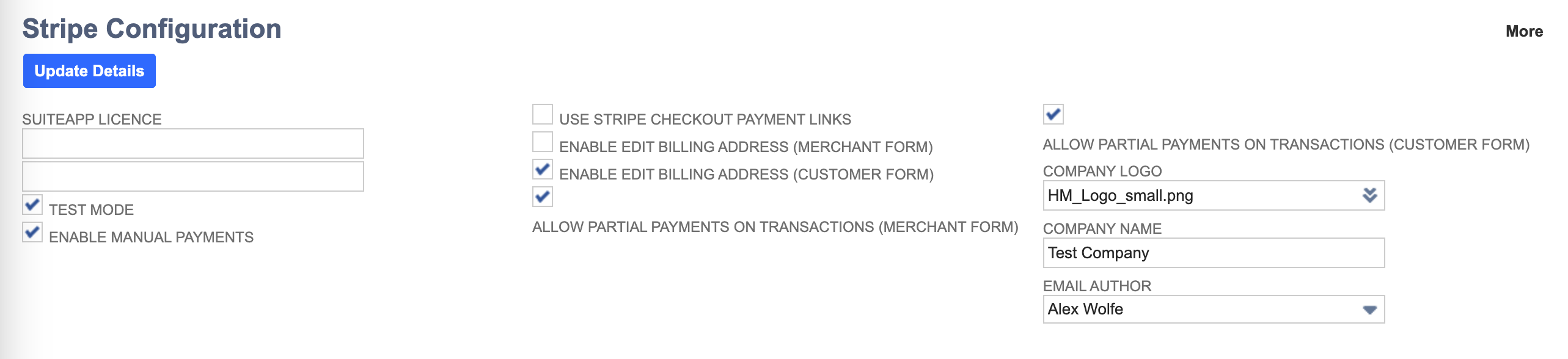
¶ Key Fields
- SuiteApp Licence: This is the most important field of the application. Without this field, the application will not be permitted to run. If you still require a licence, please contact DevGroop
¶ Optional Fields
- Test Mode: When enabled, the application will make requests to the development mode of Stripe. This is good if you want to test the application before using it within your production NetSuite account
- Enable Manual Payments: When enabled, customers will have the ability to pay for an Invoice, Sales Order, Quote, etc via a payment link that is sent to them
- Use Stripe Checkout Payment Links: When enabled, the customer (or merchant) is directed to use Stripes self-hosted checkout payment form, rather than the one provided by DevGroop
- Enable Edit Billing Address (Merchant Form): Allows payments taken by the merchant to modify the billing address before taking a payment
- Enable Edit Billing Address (Customer Form): Allows the customer to modify their billing address before making a payment
- Allow Partial Payments on Transactions (Merchant Form): If enabled, the merchant will be able to take a partial payment from the customer rather than the full total
- Allow Partial Payments on Transactions (Customer Form): If enabled, the customer will be able to submit a partial payment for a transaction, rather than the full total
- Company Logo: Upload your company logo to be used in such things as payment forms and transactional emails that get sent out by the application
- Company Name: Provide your company name so that it may be used on payment forms and transactional emails
- Email Author: When transaction emails are sent out by the application, who should the sender be? Note: This must be an active employee account